











All about Pro Speaker You’s Advocate Program
Pro Speaker You’s Advocates is the name for its affiliate program, and it works pretty much like standard affiliate programs. That is, when you recommend Pro Speaker You to someone using your special link, and they subsequently join, then you get rewarded.
However, unlike some other affiliate programs, you get compensated every time that member joins or renews their membership.
That’s right – you get paid when they first join and then you also get paid every time they renew their membership, for as long as they remain members.
How Much Am I Compensated?
How much of a commission you receive depends on your membership level.
When you join Pro Speaker You….
- As a Rising Star member, you receive 10% of the (gross) amount that a member pays Pro Speaker You to join or continue their membership. (For example, if a member joins or renews their membership and pays PSY $20, you’ll receive 10% of that, or $2.)
- As a Pro member, you receive 30% of the (gross) amount that a member pays Pro Speaker You to join or renew their membership. (For example, if a member joins or renews their membership and pays PSY $20, you’ll receive 30% of that, or $6.)
- As a Rock Star member, you receive 50% of the (gross) amount that a member pays Pro Speaker You to join or renew their membership. (For example, if a member joins or renews their membership and pays PSY $20, you’ll receive 50% of that, or $10.)
The Nitty Gritty Details
You should be rewarded for recommending membership in Pro Speaker You to pro speakers you know, and PSY’s Advocate Program does exactly that. Every member of Pro Speaker You is also an affiliate of PSY… automatically, no sign-up required.
PSY’s Advocate Program works just like most traditional affiliate programs, with one important difference:
When someone visits any page of Pro Speaker You using your affiliate URL, a cookie is set for 30 days. If a cookie containing your affiliate referral code is present after checkout, the order is logged in your affiliate’s account. That’s pretty standard.
What’s different about Pro Speaker You is that instead of sending them to an existing page of Pro Speaker You (such as the home page), you can – if you like – first create an “Advocate Letter” that explains why someone should join PSY. Then give them a URL that send people to your Advocate Letter instead. Anyone who views your Advocate Letter (assuming that your unique affiliate referral code is part of the URL) will be tagged as being referred by you, and if they join within 30 days, you’ll be compensated for the referral.
(Here’s a sample Advocate Letter, to give you an idea of what your own Letter can look like.)
How to Create an Advocate Letter
An Advocate Letter is formatted simply to resemble a traditional letterhead letter, with the Pro Speaker You logo at the top of the page. What is displayed beneath the heading is completely up to you.
Managing your Advocate Letters is as easy as managing any other Pro Speaker You resource. Just go to the Center Stage page (logging in first, if necessary) and click on the Manage Your Advocate Letters link.
You will then be shown the list of all of the Advocate Letters (if any) that you’ve already created.
To create a new Advocate Letter, simply click the Add Advocate Letter button at the top of the list. You will then be shown the WordPress editing page.
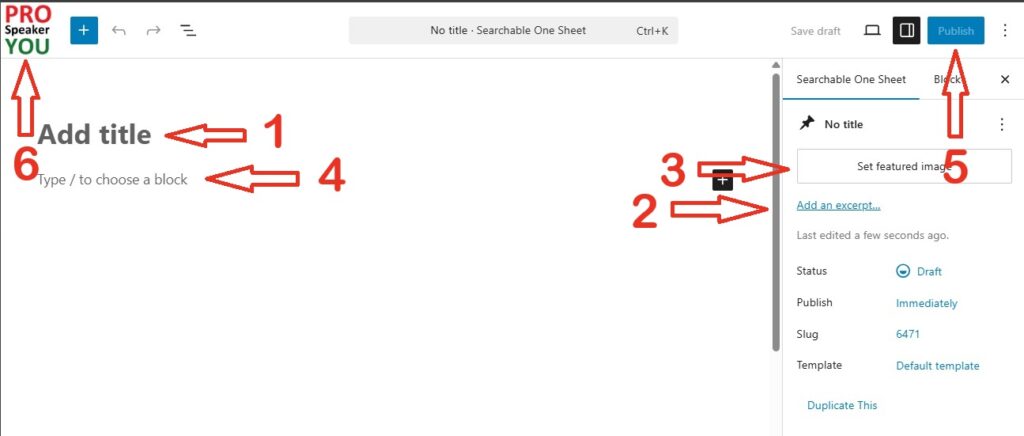
(Note: the following steps do not need to be done in this order, but you need to do them all to get your Advocate Letter to look right. The numbers are simply a convenience.)
[1]
Enter your “Title” The title is not displayed on your advocate letter, but it is displayed on the browser tab when someone looks at your letter. Otherwise, you can use it to distinguish between your different letters.
[2] and [3]
If you want to, look on the right side for the “Settings” area. (If the “Settings” area isn’t visible, just click the settings button at the top-right of the page.) Here you can enter a description of your Advocate Letter (possibly who it’s targeting) in the “Excerpt” field and an image of your choice as the Featured Image.
Neither the information you enter into the ‘Excerpt’ nor the Featured Image will be displayed on your Advocate Letter. They are for your use only!
[4]
Create the full Advocate Letter in the space below “Title” using the WordPress Gutenberg editor. Your Promotion Page is a full description of the product or service that you’re selling.
WordPress is one of the most powerful, popular, and customizable platforms in the world, so there’s a chance that you’re already familiar with it. If you need help using the block editor, you might try WordPress’ tutorial at https://wordpress.org/documentation/article/wordpress-block-editor/ .
[5] and [6]
Finally, be sure to publish your new Advocate Letter. After you’ve published your Advocate Letter, click the Pro Speaker You button in the upper left corner of this page to return to the list of all your Advocate Letters.
How to Edit an Advocate Letter
Editing an existing Advocate Letter is straightforward. Simply go to the Center Stage, and then go to Manage Your Advocate Letter (just like you did to create the Advocate Letter). But this time, click “edit” on the particular Advocate Letter that you want to edit.
This will take you to the WordPress editing screen, where you can perform whatever edits you want.
When you’re done, be sure to SAVE your edited Advocate Letter. And then click the Pro Speaker You button in the upper left corner of the page to return to the list of all your Advocate Letters.
Deleting an Advocate Letter
Deleting an Advocate Letter is easy. Just go to Center Stage and then Manage Your Advocate Letters. On the Advocate Letter that you want to get rid of, just click “delete”.
If you do decide to delete an Advocate Letter, please note that it isn’t gone permanently – it’s been moved to the trash. To restore or permanently remove a trashed Advocate Letter, simply go to the list of your untrashed Advocate Letters and click on the “Trash” link. This will now display your trashed Advocate Letters (if any); restore or delete (permanently) them as you wish.