










Stuff About the "Stuff 4 Speakers Marketplace"
Simply put, Stuff 4 Speakers is marketplace of resources specifically for speakers. Members of Pro Speaker You can sell their own products and services through Stuff 4 Speakers to speakers, similar to other e-commerce sites, but with one significant difference… when you complete a sale through Pro Speaker You, you pay no commission. All of the money goes to you! (Of course, you are responsible for any credit card fees or other transaction costs.)
How many Promotion Pages you can have in Stuff 4 Speakers depends on your membership level.
- You cannot sell resources through Stuff 4 Speakers unless you have a Pro- or Rock Star-level of membership in Pro Speaker You.
- As a Pro member of Pro Speaker You, you have one Promotion Page available to you.
- As a Rock Star member of Pro Speaker You, you have a whopping seven (7!) Promotion Pages available for your use.
Creating Your Promotion Page
Creating a Promotion Page is easy. Just go to the Center Stage page (logging in first, if necessary) and click on the Manage Your Promotion Pages link. You will then be shown the list of all of the Promotion Pages (if any) that you’ve already created.
To create a new Promotion Page, simply click the Add Promotion Page button at the top of the list. You will then be shown the WordPress editing page.
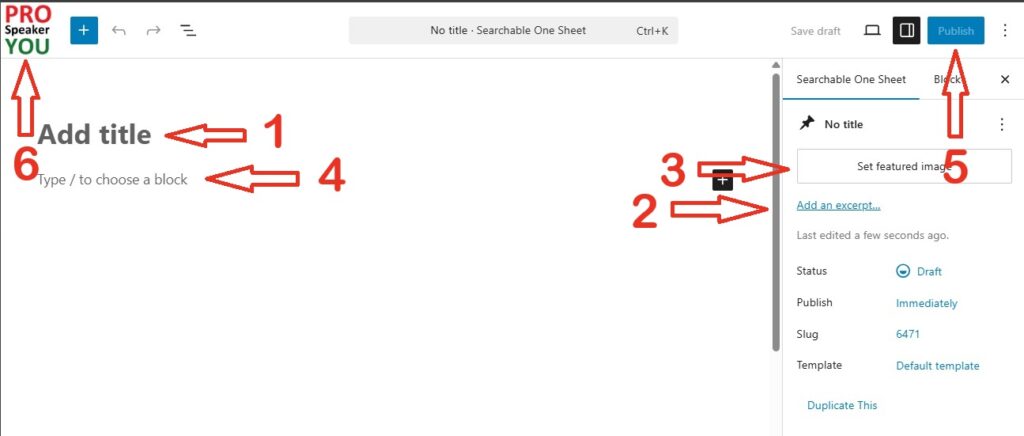
(Note: the following steps do not need to be done in this order, but you need to do them all to get your Promotion Page to look right. The numbers are simply a convenience.)
[1]
Enter the name of the resource as the “Title”.
[2]
Next, look on the righthand side for the “Settings” area. (If the “Settings” area isn’t visible, just click the settings button at the top-right of the page.) Next, enter a short but compelling description of your resource in the “Excerpt” field.
[3]
In the same Settings area, enter a photo of the resource you’re selling (or if you’re selling a service, provide an image that’s descriptive of the service) as the “Featured Image”. You can add an image already in your personal library, or you can upload an image to your library. Note: squarish images display best. Also note: although we attempt to optimize images for you, uploading overly large images will slow down the display of your Promotion Page. Try to keep your images relatively small.
[4]
Create the full Promotion Page in the space below “Title” using the WordPress Gutenberg editor. Your Promotion Page is a full description of the product or service that you’re selling.
WordPress is one of the most powerful, popular, and customizable platforms in the world, so there’s a chance that you’re already familiar with it. If you need help using the block editor, you might try WordPress’ tutorial at https://wordpress.org/documentation/article/wordpress-block-editor/ .
[5]
Finally, be sure to publish your new Promotion Page.
[6]
After you’ve published your Promotion Page, click the Pro Speaker You button in the upper left corner of this page to return to the list of all your Promotion Pages.
How to Edit a Promotion Page
Editing an existing Promotion Page is straightforward. Simply go to the Center Stage, and then go to Manage Your Promotion Page (just like you did to create the Promotion Page). But this time, click “edit” on the particular Promotion Page that you want to edit.
This will take you to the WordPress editing screen, where you can perform whatever edits you want.
When you’re done, be sure to SAVE your edited Promotion Page. And then click the Pro Speaker You button in the upper left corner of the page to return to the list of all your Promotion Pages.
Deleting a Promotion Page
Deleting a Promotion Page is easy. Just go to Center Stage and then Manage Your Promotion Pages. On the Promotion Page that you want to get rid of, just click “delete”.
Deleting a Promotion Page is easy, but do you really want to do it? You’ll lose any SEO “links” that your page might have accumulated, so you might want to consider replacing everything in your unwanted Promotion Page instead of actually deleting it. Just a thought – your call.
If you do decide to delete a Promotion Page, please note that it isn’t gone permanently – it’s been moved to the trash. This has a couple of consequences – one, you can recover your Promotion Page if you change your mind about getting rid of it. But more importantly, the maximum number of Promotion Pages that your membership level allows you is based on the sum of your all your Promotion Pages including the “trashed” ones.
To restore or permanently remove a trashed Promotion Page, simply go to the list of your untrashed Promotion Pages and click on the “Trash” link. This will now display your trashed Promotion Pages (if any); restore or delete (permanently) them as you wish.